Facebook, the most popular social networking gets even more popular, every time new features and apps are are added to it. It has grown so much in terms of traffic that it is the biggest photo & video sharing service on the web. Don’t you wish that the default photo uploader was little more user friendly? Well, there is a third party app for that anyway,
Here is a simple guide to get you started.
Step 1: Download Easy Photo Uploader
Step 2: Right Click on the icon (as shown in screenshot) and select the option “Send Your Photos to Facebook”.
 Step 3: After selecting this option, it will ask you to select the Facebook account as shown in screen-shots.
 Step 4: After clicking on existing Facebook account, it will ask for login details like this
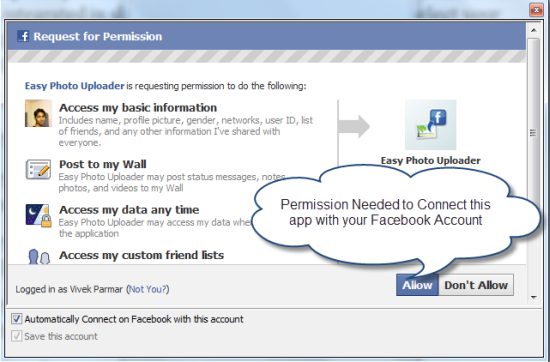
 Step 5: Now it will ask for permission as shown in screenshot.
 Step 6: After completing all the steps, all you need is to select the album and start uploading photos in it or you can simply create a new album.
 Step 7: Now you can simply upload the photos to your account. Now with this tool you can easily upload your photos to Facebook account.
That’s it! Make sure you give it a try if you are one of those compulsive Facebook Photos user.
{via:techpp.com}
Easy Photo Uploader
Easy Photo Uploader allows you to automatically resize and upload photos to existing or new Facebook photo album. It is integrated in shell menu of Windows, so you can select your picture(s), right click and select the menu item “Send your photo(s) to Facebook”.Here is a simple guide to get you started.
Step 1: Download Easy Photo Uploader
Step 2: Right Click on the icon (as shown in screenshot) and select the option “Send Your Photos to Facebook”.



That’s it! Make sure you give it a try if you are one of those compulsive Facebook Photos user.
{via:techpp.com}
Comments
Post a Comment